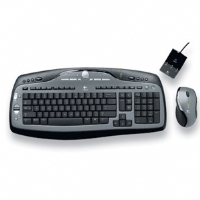
Logitech MX3000 Cordless Keyboard and Laser Mouse Desktop (MX600)
?>
Logitech MX3000 Cordless Keyboard and Laser Mouse Desktop (MX600)
Mark: Good
Mouse only works with the new amouse USBmouse.sys 8/06. The multimedia keys
on the key board don't work. Use /Device:1 on both the USB keyboard and
mouse drivers. On cold reboot the mouse and keyboard may fail unplugging
and repluging the wireless receiver corrects the problem.
I have a logitech MX3000. I use to experience the Alt key sticking but
it seemed to have resolved when I added /Device:1 to the usb keyboard driver.
/DEVICE:n Parameter is added to select which USB device to serve
in multidevice configurations (several keyboards devices attached to USB bus).
Information is sent by: Gregg Young -- 2006-08-29 16:58:34
****************************************
[GoogleAdv]
Test the program:
PMView work on your computer during several years. It's time to reward the developer (+ send bug-reports and ideas to the developer).
eCo Software doesn't drill oil or gas, we don't cultivate bananas.
eCo Software is developing applications and exporting this products to Europe.
We pay taxes and feed pensioners, teachers and policemen.


 eCo Software doesn't drill oil or gas, we don't cultivate bananas.